
|
|
EIDORS: Electrical Impedance Tomography and Diffuse Optical Tomography Reconstruction Software |
|
EIDORS
(mirror) Main Documentation Tutorials Download Contrib Data GREIT Browse Docs Browse SVN News Mailing list (archive) FAQ Developer
Hosted by |
2D Geophysical models with DistmeshThis tutorial shows building of 2D geophysical models with distmesh.
Create fine meshHere we simulate the fine model with distmesh. Note that to be stable, points on the mesh corners need to be supplied to distmesh.
% Geophysics model $Id: dm_geophys01.m 2796 2011-07-14 23:14:21Z bgrychtol $

n_nodes= 2000;
z_contact= 0.01;
n_elec= 9;
nodes_per_elec= 5;
elec_width= 0.2;
elec_spacing= 1.0;

xllim=-10; xrlim= 10; ydepth=-10;
xgrid=  linspace(-elec_width/2, +elec_width/2, nodes_per_elec)';
x2grid= elec_width* [-5,-4,-3,3,4,5]'/4;
refine_nodes= [xllim,0; xrlim,0; 0, ydepth];
for i=1:n_elec
% Electrode centre
  x0= (i-1-(n_elec-1)/2)*elec_spacing;
  y0=0;
  elec_nodes{i}= [x0+ xgrid, y0+0*xgrid];
  refine_nodes= [ refine_nodes; ...
                 [x0 + x2grid   ,  y0             + 0*x2grid];
                 [x0 + xgrid*1.5,  y0-elec_width/2+ 0*xgrid];
                 [x0 + x2grid*1.5, y0-elec_width/2+ 0*x2grid];
                 [x0 + xgrid*2   , y0-elec_width  + 0*xgrid];
                 [x0 + xgrid*2   , y0-elec_width*2+ 0*xgrid]];
end

% Distance to edge
%fd=inline('-min([10+p(:,1),10-p(:,1),-p(:,2),10+p(:,2)],[],2)','p');
fd=inline('-min(-p(:,2),10-sqrt(sum(p.^2,2)))','p');
bbox = [xllim,ydepth;xrlim,0];
gmdl= dm_mk_fwd_model( fd, [], n_nodes, bbox, ...
                          elec_nodes, refine_nodes, z_contact);


% Refine elements near upper boundary
n_nodes= 3000;
fh=inline('min(0.5-p(:,2)/4,2)','p');
fmdl= dm_mk_fwd_model( fd, fh, n_nodes, bbox, ...
                          elec_nodes, refine_nodes, z_contact);

% Show results - big
subplot(121)
show_fem(gmdl);axis equal; axis([-11 11 -11 1]);
subplot(122)
show_fem(fmdl);axis equal; axis([-11 11 -11 1]);

print_convert dm_geophys01a.png '-density 150'

% Show results - small
subplot(121)
show_fem(gmdl); axis equal; axis([-3,3,-3,0.3]);
subplot(122)
show_fem(fmdl); axis equal; axis([-3,3,-3,0.3]);
print_convert dm_geophys01b.png '-density 150'
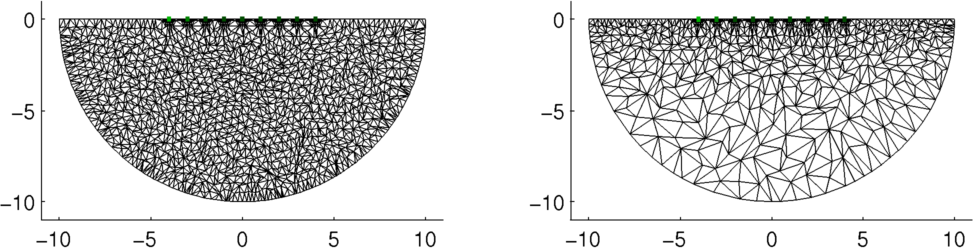
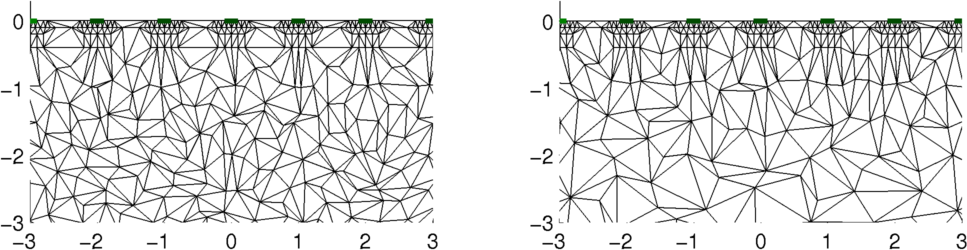
Figure: Geophysical model with electrodes on surface from distmesh Left: Uniform mesh density Right: Mesh density refined going from surface to bottom Create rectangular coarse meshHere we simulate the coarse model using the mk_common_model function. Clearly, it would make more sense to use a more rectangular mesh in this case.
% Create and show square model $Id: dm_geophys02.m 3905 2013-04-18 18:19:30Z aadler $

% Create square mesh model
imdl= mk_common_model('c2s',16);
cmdl= rmfield(imdl.fwd_model,{'electrode','stimulation'});

% magnify and move down onto geophysics model
cmdl.nodes(:,2)= cmdl.nodes(:,2) - 1.02;
cmdl.nodes= cmdl.nodes*4;

% assign one parameter to each square
e= size(cmdl.elems,1);
params= ceil(( 1:e )/2);
cmdl.coarse2fine = sparse(1:e,params,1,e,max(params));

clf;
show_fem(fmdl);
hold on;
h= trimesh(cmdl.elems,cmdl.nodes(:,1),cmdl.nodes(:,2));
set(h,'Color',[0,0,1],'LineWidth',2);
hold off
axis image

print_convert dm_geophys02a.png '-density 125'
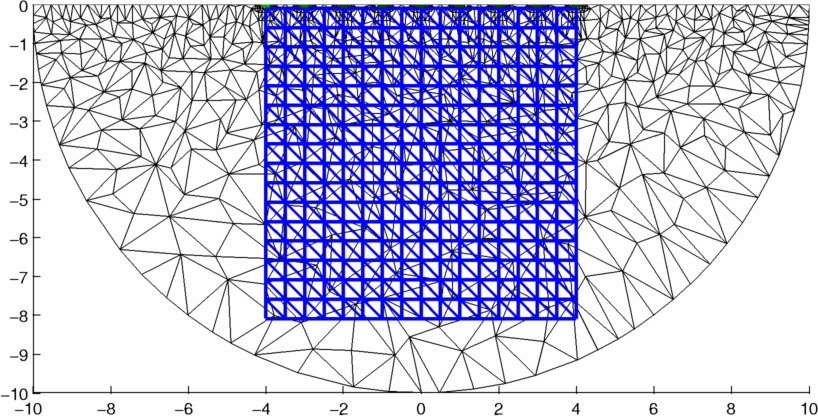
Figure: Coarse mesh (blue) superimposed onto the fine mesh (black). Electrode positions are shown in green. Simulate TargetA target is simulated as a square region. This is interpolated onto the fine mesh using the interp_mesh function.
% simulate targets $Id: dm_geophys03.m 4053 2013-05-24 11:14:47Z bgrychtol $

fmdl.stimulation= mk_stim_patterns(n_elec, 1, [0,1],[0,1], {}, 1);
fmdl = mdl_normalize(fmdl,1);
img= mk_image(fmdl,1);
vh= fwd_solve(img);

% interpolate onto mesh
xym= interp_mesh( fmdl, 3);
x_xym= xym(:,1,:); y_xym= xym(:,2,:);
ff  = (x_xym>-3) & (x_xym<-2) & (y_xym<-2) & (y_xym>-3);
ff = mean(ff,3);
img.elem_data= img.elem_data + ff;

% inhomogeneous image
vi= fwd_solve(img);

show_fem(img); axis image;
print_convert dm_geophys03a.png '-density 125'
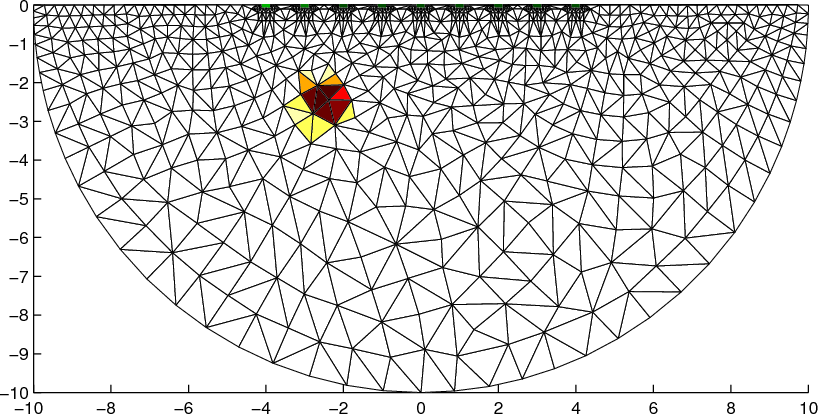
Figure: Simulated position of target in the fine mesh Reconstruct image using dual modelThe image is reconstructed onto the coarse (rectangular) mesh
% 2D solver $Id: dm_geophys04.m 3905 2013-04-18 18:19:30Z aadler $

% Create a new inverse model, and set
% reconstruction model and fwd_model
imdl= mk_common_model('c2c2',16);
imdl.rec_model= cmdl;
fmdl.jacobian = @jacobian_adjoint;
imdl.fwd_model= fmdl;

c2f= mk_coarse_fine_mapping( fmdl, cmdl);
imdl.fwd_model.coarse2fine = c2f;
imdl.RtR_prior = @prior_laplace;
imdl.solve = @inv_solve_diff_GN_one_step;
imdl.hyperparameter.value= 1e-3;


imgs= inv_solve(imdl, vh, vi);
imgs.calc_colours.ref_level= 0;

show_fem(fmdl); ax= axis;
hold on
show_fem(imgs);
hold off
axis(ax); axis image
print_convert dm_geophys04a.png '-density 125'
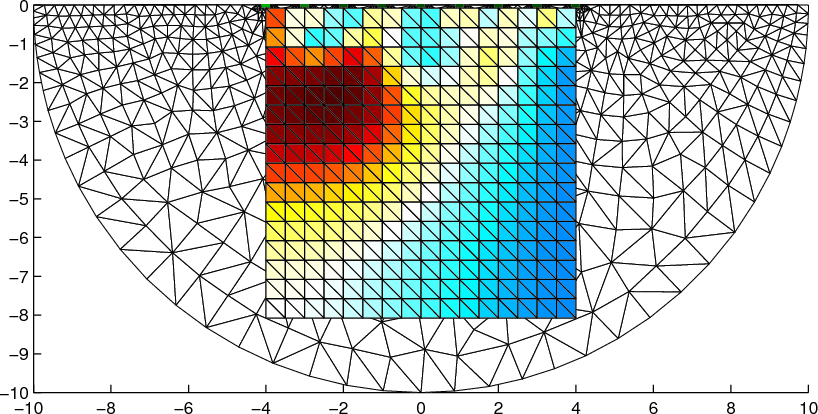
Figure: Reconstructed target showing coarse and fine mesh in background. |
Last Modified: $Date: 2013-04-17 17:08:07 -0400 (Wed, 17 Apr 2013) $ by $Author: aadler $